
Bloom Bot for Beginners: Zero Experience Needed, Under 3 Minutes, From Your Phone
Bloom Bot for Beginners: Zero Experience Needed, Under 3 Minutes, From Your Phone
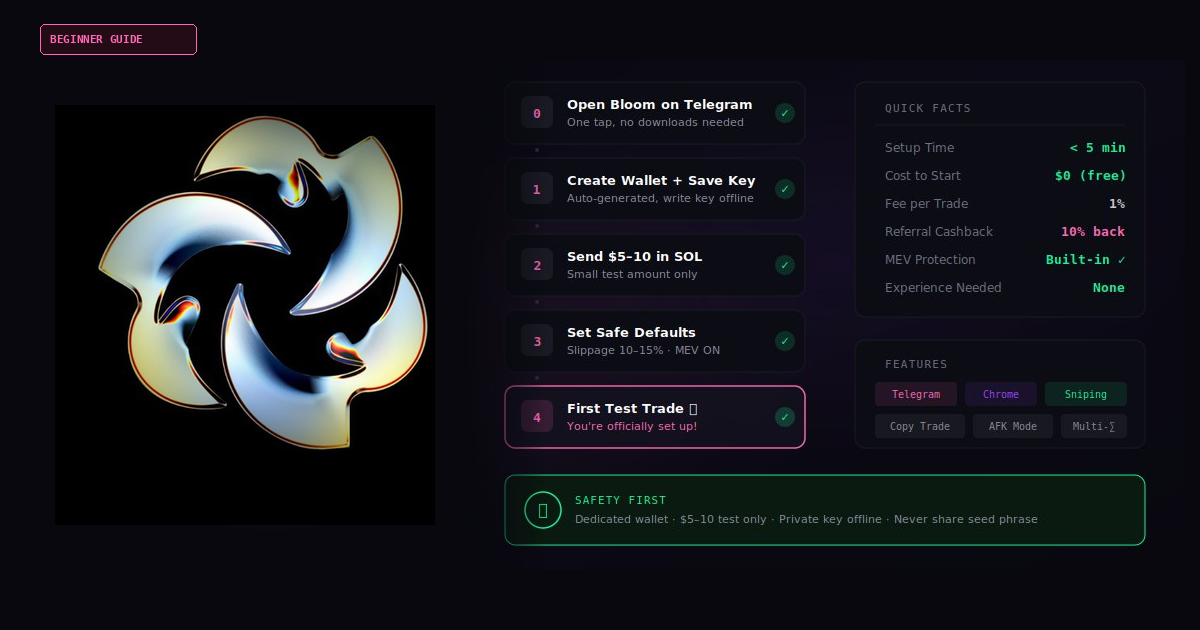
You Don’t Want to Lose Money. I Get It.
You’ve probably heard people talk about trading Solana tokens. Maybe you’ve seen someone brag about turning $50 into $500 on a memecoin.
And your first thought was: “That sounds cool, but I’d probably lose everything.”
That’s not a dumb thought. That’s a smart thought.
Most people DO lose money — because they don’t know how to set things up safely. They use the wrong settings. They skip steps. They rush in with too much money.
This guide is different.
I’m going to walk you through Bloom Bot — a free Telegram trading bot for Solana — step by step. No confusing jargon. No skipped steps. And most importantly, no pressure to risk more than a few dollars.
By the end of this article, you’ll have Bloom running on your phone, configured safely, and you’ll have completed your first small test — with full control.
Ready? Let’s go.
What You’ll Be Able to Do After Reading This (30-Second Summary)
- ✅ Open Bloom Bot on Telegram in one tap
- ✅ Create your own Solana wallet inside the bot
- ✅ Understand the basic settings (so you don’t accidentally lose money)
- ✅ Make a small, safe test trade — just to see how it works
- ✅ Know exactly what to do next
Total time: Under 5 minutes.
No coding. No downloads. No experience needed.
What Is Bloom Bot? (Plain English, No Jargon)
Bloom Bot is a trading tool that lives inside Telegram — the messaging app you probably already have.
Think of it like this:
Instead of going to a complicated exchange website, logging in, finding charts, placing orders… you just send a message inside Telegram. Bloom does the rest.
Here’s what Bloom can do:
- Buy and sell Solana tokens — directly from your phone
- Sniper mode — automatically buy new tokens the moment they launch (you don’t have to sit and watch)
- Copy trading — automatically copy what successful traders are doing
- AFK mode — set rules and let Bloom trade for you while you’re away
- Anti-MEV protection — this helps protect against a common trick where bots steal a tiny profit from your trade before it goes through (this is called “front-running”)
What makes Bloom a good fit for beginners?
I’ve spent hundreds of hours testing Solana trading bots and writing beginner-friendly setup guides. Here’s what stood out about Bloom:
- Hybrid trading: Bloom works on both Telegram AND a Chrome extension. Start on your phone, switch to desktop whenever you want.
- Multi-chain support: Bloom works on Solana and multiple other chains, so you’re not locked into one ecosystem.
- No upfront cost: According to Bloom’s official site, there’s no subscription — a 1% fee is applied only on executed transactions, with no hidden or recurring charges. (These details are listed in Bloom’s official FAQ.)
Why Start From This Link?
Fair question. Here’s the honest answer.
When you open Bloom through this link, you’re using a referral link. This does two things:
- You get a 10% cashback on trading fees. According to Bloom’s official site, they provide a 10% cashback on trading fees when you register through a valid referral code. In practice, this reduces your net fee on every trade.
- I get a small referral reward. This is how I keep writing free guides like this one.
There’s no downside for you. Same bot, same features, same security — but with a fee discount from day one.
If you open Bloom by searching for it yourself (without a referral link), you miss the cashback. So if you’re going to try Bloom anyway, start through a referral.
Don’t worry — clicking this link doesn’t commit you to anything. It just opens the bot in Telegram. You can look around before doing anything.
Pre-Setup Checklist
Before we start, make sure you have these:
- Telegram installed on your phone (iPhone or Android) or desktop
- A Telegram account (you need one to use any Telegram bot)
- A small amount of SOL — $5 to $10 is plenty for your first test (we’ll cover how to get this)
- 5 minutes of uninterrupted time
Got all four? Let’s set up.
Step-by-Step Setup (Do Exactly This)
-
Open Bloom Bot
→ Tap this link: https://t.me/BloomSolana_bot?start=ref_tokugawa
→ Telegram will open with Bloom’s chat window.
→ Tap “Start” at the bottom.🔧 Stuck? If Telegram doesn’t open, install Telegram on your device first, then come back here and tap the link again.
-
Create Your Wallet
→ Bloom will auto-generate a new Solana wallet for you.
→ You’ll see a wallet address (a long string like7xKp...).
→ Tap the button to export your private key.
→ Write the private key down on paper. Store it offline.⚠️ This is your master key. If you lose it, nobody can recover your funds. Never share it with anyone — not me, not “Bloom support,” not anyone. If someone asks for it, it’s a scam.
-
Send a Small Amount of SOL
→ Copy your new wallet address from Bloom (tap on it).
→ Open the app where you hold SOL (Phantom, Coinbase, Binance, etc.).
→ Send $5 to $10 worth of SOL to the copied address.🕐 Solana transfers usually arrive in under 10 seconds. If it takes more than 2 minutes, double-check the address.
🔧 Don’t have SOL yet? Buy $10 worth on any major exchange, then send it to your Bloom wallet address.
-
Check Your Balance
→ Back in the Bloom chat, tap “Wallet” or “Balance”.
→ You should see the SOL you just sent (minus a tiny network fee).If it shows up — you’re ready.
-
Adjust Safety Settings
Do not skip this step.
→ Find the Settings or Config menu inside Bloom.
→ Set slippage to 10–15% for memecoins, or 1–3% for established tokens.
→ Set a default buy amount you’re comfortable losing entirely (e.g. 0.05 SOL).
→ Turn on MEV protection (anti-front-running).💡 What’s slippage? It’s the maximum price shift you’ll accept between clicking “buy” and the trade going through. Think of it like buying coffee for $5 — a 10% slippage means you’re OK paying up to $5.50 if the price changes while you’re at the register.
Note: Menu names may vary slightly depending on updates. Look for keywords like “Slippage,” “Buy Amount,” and “MEV.” If your trade fails, try increasing slippage by 5% and retry.
-
Make Your First Test Trade
→ Browse trending tokens inside Bloom, or paste a token contract address.
→ Tap “Buy”.
→ Confirm the amount (should be the small default from Step 5).
→ Confirm the transaction.You’ll see a confirmation showing how much you paid, how many tokens you got, and a transaction link you can verify on a Solana explorer.
🎉 That’s it. You just made your first trade using a Telegram bot.
→ To sell: tap on your position and hit “Sell”. You can sell all or part.
Your First Safe Test — The Rules
Let me be direct: trading memecoins is risky. Most new tokens lose value. Some go to zero. This is not a “get rich quick” guide.
Here’s how to minimize risk while learning:
Rule 1: Only use money you can afford to lose completely.
Your first $5–10 is tuition. You’re paying to learn. If it goes to zero, you’ve learned a valuable lesson for cheap.
Rule 2: Start with $5–10. Not $50. Not $100.
Get comfortable with the mechanics first — buy, sell, check slippage, set limits. THEN increase. Not before.
Rule 3: Don’t chase hype.
If someone on Twitter says “THIS TOKEN IS GOING 100X” — that usually means it already went up and you’re about to buy the top.
Rule 4: Use the features.
Bloom has limit orders and stop-losses. Use them. They exist so you don’t have to stare at your phone all day. Check the bot’s menu for how to set these up.
Suggested first test amounts:
- Very cautious: $3–5
- Standard beginner: $5–10
- Comfortable with crypto: $10–20
These are NOT investment recommendations. They’re reference points for learning.
Why This Approach Works (The Science Behind It)
You might wonder: “Why are you telling me to start so small? Why not just go for it?”
There’s actual research behind this approach:
Loss aversion (Kahneman & Tversky): People feel losses about twice as strongly as gains. If you start with $100 and lose $50, you’ll feel terrible — and probably quit forever. If you start with $5 and lose $3, you’ll think “OK, that was interesting. Let me try again smarter.” Same lesson, completely different emotional outcome.
Cognitive load theory: When you’re learning a new tool AND making financial decisions at the same time, your brain gets overloaded. By keeping the money tiny, you remove the financial stress and can actually focus on learning how the bot works.
Choice overload (Schwartz, “The Paradox of Choice”): Bloom has dozens of features. If you try to use all of them on day one, you’ll freeze. This guide gives you exactly one path: set up → small test → observe. You can explore everything else later.
Minimum viable test: In security and risk management, there’s a principle called “minimum viable exposure.” You test a system with the smallest possible stake before committing more. Professional traders do this. Quant funds do this. You should too.
Separation of funds: Never put all your crypto in one place. Keep your main holdings in a hardware wallet or secure app. Only send small amounts to your trading bot for active use. This is called “compartmentalization” — if anything goes wrong with one tool, your main funds stay safe.
FAQ — Honest Answers to Your Worries
Q1: “Is Bloom a scam?”
Bloom is designed as a non-custodial bot — meaning you hold your own wallet keys, not Bloom. Their official site states they use advanced encryption and that no sensitive information is accessible to third parties. That said, like ANY trading tool, if you make bad trades, you lose money. That’s trading, not a scam. Always verify you’re using the official Bloom bot, and never click links from random accounts claiming to be “Bloom support.”
Q2: “Is it hard to use?”
If you can use Telegram, you can use Bloom. The setup takes under 5 minutes. The interface is buttons and menus — no coding, no command lines.
Q3: “What if I lose money?”
You probably will lose some money while learning. That’s normal. That’s why we start with $5–10 — so the “tuition” is cheap. No trading bot guarantees profits. Anyone who says otherwise is lying.
Q4: “Are the fees high?”
According to Bloom’s official site: a 1% fee on executed transactions, no subscription, no hidden charges. With a referral link, you get a 10% cashback on that fee, which reduces your net cost on every trade.
Q5: “What about taxes?”
Crypto trades may be taxable in your country. In the US, each trade is a taxable event. Bloom doesn’t file taxes for you. Keep records of your trades (Bloom shows your trade history). Consult a tax professional if you’re unsure.
Q6: “Can I get hacked?”
Bloom’s official site states they follow strict security standards and use advanced encryption to protect user data. But the biggest risk is always YOU giving away your private key to a phishing scam. Protect yourself: never share your private key with anyone, never enter it on a website, never send it to “support,” enable 2FA on your Telegram account, and keep your phone/PC locked. Follow these basics and you’re already safer than most.
Q7: “What if I send SOL to the wrong address?”
Blockchain transactions are irreversible. Triple-check the address before sending. Start with a small test amount. If it arrives safely, then send more.
Q8: “Is this legal?”
Trading crypto is legal in most countries. Some have restrictions. Check your local regulations. Bloom itself is just a tool — how you use it is your responsibility.
Q9: “What’s better — Bloom, Trojan, or Axiom?”
I’ve spent a lot of time testing Solana trading bots. Each has strengths. What makes Bloom a good starting point for beginners is the combination of a simple Telegram interface, the Telegram + Chrome extension hybrid option, and multi-chain support out of the box. As you gain experience, you may want to explore other bots too — there’s no single “best” bot for everyone.
Q10: “What if I want to stop using Bloom?”
Withdraw your SOL from the Bloom wallet back to your main wallet. You own the private key, so your funds are always under your control. There’s no lock-in period, no cancellation fee, nothing.
Q11: “Do I need to keep Telegram open for trades to work?”
Bloom’s official site describes AFK mode as allowing you to “execute buys and sells while you are away.” Some automation features may continue running even when Telegram is closed. For exact behavior, check the AFK/automation notes inside the bot.
Q12: “Can I use Bloom on multiple devices?”
Yes. Since Bloom is a Telegram bot, you can access it anywhere you’re logged into Telegram — phone, tablet, or desktop.
Real Beginner Scenarios
Scenario A: Complete Beginner — “I’ve Never Traded Crypto Before”
Alex had never used a trading bot. He opened Bloom through a referral link, sent $5 in SOL, and made his first test buy — a small amount of a trending memecoin. It went down 20%. He sold and lost about $1. But he learned how to buy, sell, check his balance, and verify a transaction on a Solana explorer. The next week, he tried again with slightly better timing and made $2 profit on a $5 trade. Three weeks later, he was comfortable enough to increase his test amount to $20. Slow, steady, no panic.
Scenario B: Busy Professional — “I Have 10 Minutes a Day”
Maria works full time and can’t watch charts. She set up Bloom in under 5 minutes, explored the copy trading feature, and set conservative stop-losses. She checks the bot once in the morning and once at night. Total time: about 10 minutes per day. She treats it like a side experiment — small amounts, automated rules, zero stress.
Scenario C: Security-Focused User — “I Don’t Trust Anything”
Ken is careful about security (which is smart). He created a brand new Telegram account just for Bloom. He uses a separate Solana wallet for Bloom — never his main one. He only keeps $15–20 in the Bloom wallet at any time. He wrote down his private key on paper and stores it offline. He enabled 2FA on Telegram. He never clicks links from anyone claiming to be “Bloom support.” His main portfolio stays untouched in cold storage.
It’s Time to Start
You’ve read the guide. You understand the risks. You know the setup takes under 5 minutes and costs nothing until you actually trade.
There’s only one thing left to do:
Then follow Steps 1–6 above. That’s it.
3-Line Quick Start (Copy-Paste Version)
2. Tap “Start” → Save your private key → Send $5-10 in SOL to your new wallet
3. Set slippage to 10-15%, MEV protection ON, and make your first small test buy
Completion Checklist
After following this guide, check off each item:
- Opened Bloom Bot through the referral link (10% fee cashback activated)
- Tapped “Start” and created my wallet
- Saved my private key in a safe offline location
- Enabled 2FA on my Telegram account
- Sent a small amount of SOL ($5–10) to my Bloom wallet
- Confirmed my balance shows up in the bot
- Set slippage to 10–15%
- Turned on MEV protection
- Set a small default buy amount
- Made my first test trade
- Verified the transaction on a Solana explorer
- Know how to sell my tokens
All boxes checked? You’re officially set up. Welcome to Bloom. 🌸