How to Copy Trade on Solana (2026): Find Winning Wallets & Mirror Safely
How to Copy Trade on Solana (2026): Find Winning Wallets & Mirror Safely
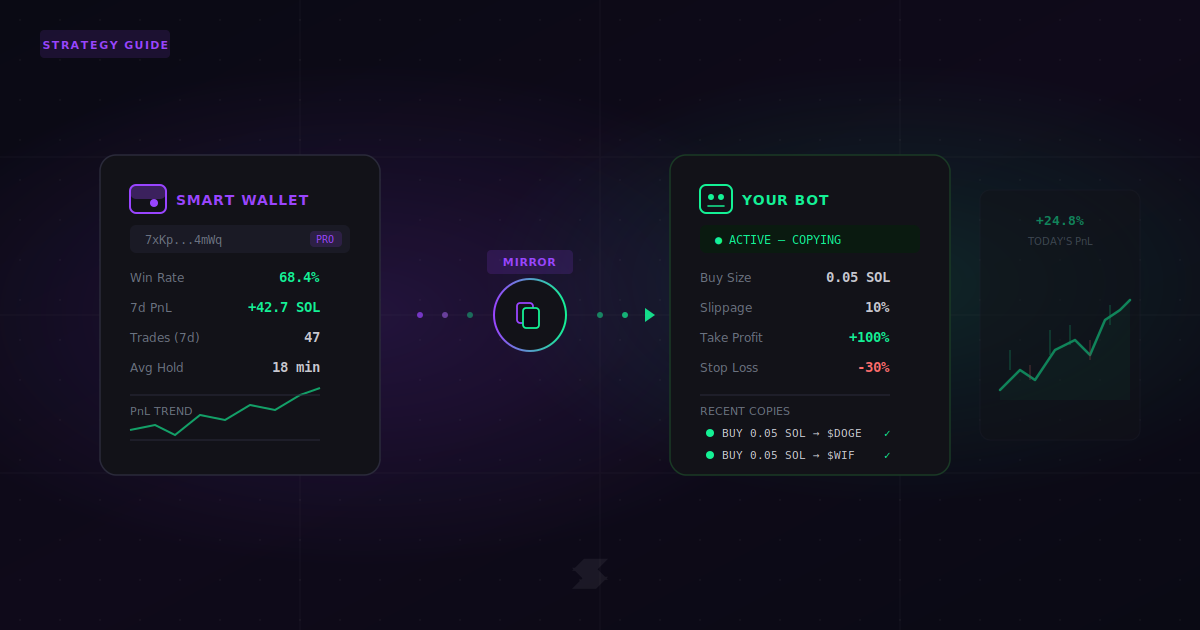
Every wallet on Solana is public. Every buy, every sell, every profit and loss is visible to anyone who looks. Copy trading takes advantage of this — you find wallets that are consistently profitable, then mirror their trades using a bot.
The concept is simple. The execution is where most people lose money. They copy the wrong wallets, use the wrong settings, enter too late, or don’t know when to exit. This guide covers the exact process — from finding wallets to configuring your bot — with specific numbers, real settings, and concrete steps you can follow without guessing.
📌 Quick Links: What Do You Need?
Find & track wallets → GMGN Setup Guide
Execute trades (Telegram) → Trojan Setup
Execute trades (Web) → Axiom Setup
Fix failed copy trades → Slippage Settings · Priority Fees · Why Trades Fail
What Is Copy Trading on Solana?
Copy trading means watching what a profitable wallet does on-chain and replicating those trades with your own wallet and bot. On Solana, every transaction is public and confirms very fast, so you can see what a wallet buys and mirror it within seconds — sometimes automatically.
There are three levels of copy trading, from simplest to most advanced:
- Alerts only (watching): You track a wallet and get a notification when it buys or sells. You decide whether to act manually. This is the safest starting point.
- Manual mirroring: You see the alert, open your trading bot, and execute the same trade yourself. You control the timing and size.
- Automated copy: Your bot automatically buys when the tracked wallet buys, and optionally sells when they sell. Hands-free, but the riskiest if misconfigured.
This is fundamentally different from copy trading on centralized exchanges like Binance or Bybit. On a CEX, the platform manages the connection and execution. On Solana, you are responsible for everything — finding the wallet, configuring the bot, managing slippage, paying priority fees, and deciding when to stop. There is no safety net.
📋 The 30-Second Rule (Before You Copy Any Wallet)
- Watch for at least 48 hours before copying any wallet with real money — see how they trade across different market conditions
- Start with 0.02–0.05 SOL per trade to test mechanics, not strategy. You’re checking that your bot works, not trying to profit yet
- If 2 consecutive copy trades fail → stop and check your settings. Usually it’s slippage too low or priority fee too low. See slippage guide and priority fees guide
- If buys work but sells fail → stop immediately. The token may be a honeypot (a token you can buy but not sell). See why trades fail
How to Find Wallets Worth Copying
This is where most people go wrong. They see a wallet with a 500% gain on one trade and start copying it immediately. But one big win tells you nothing about consistency — and in many cases, it’s a trap designed to attract copy traders who become exit liquidity.
Where to Find Wallet Candidates
The fastest way to discover profitable wallets is through GMGN’s Smart Money features. Here’s the exact workflow:
GMGN Web → "Smart Money" tab or App → "Track" → "Rank / Radar"
Sort by: 7-day PnL (not all-time) → Filter for wallets with 30+ trades in the past 7 days
Cross-reference on Birdeye (wallet analytics) or Dexscreener (trade history) to verify the wallet isn’t gaming its stats
You can also find wallets by looking at the “Top Traders” section of any token page on GMGN or Birdeye. When you see a token that pumped, check who bought it early — then look at that wallet’s full history, not just the one winning trade.
5 Metrics That Actually Matter
Don’t rely on a single number. Evaluate every wallet across these five metrics before adding it to your tracking list:
| Metric | What to Look For | Red Flag |
|---|---|---|
| Trade frequency | 20–50 trades per week (enough data to evaluate) | Fewer than 5 trades total (can’t assess pattern) |
| Win rate (7-day) | 55–70% over many trades | 95–100% (usually means too few trades or wash trading) |
| Avg hold time | Consistent pattern (minutes OR hours — not random) | 15–20% of trades sold in under 5 seconds (farming copiers) |
| PnL trend | Steady upward curve over 7–14 days | One massive spike followed by flat or down (one-hit wonder) |
| Trade size | Consistent sizing (e.g., always 0.5–2 SOL) | Random swings from 0.1 SOL to 50 SOL (unpredictable risk) |
Red Flags: Wallets You Should NOT Copy
🚩 Skip These Wallets Immediately
- Bundler wallets: Multiple wallets buying the same token in the same block. This usually means a token creator is pumping their own launch. You can check this in GMGN’s “insider traders” section — it flags snipers and the first 70 buyers of any token
- Instant-sell wallets: If 15–20% or more of their trades are sold within 5 seconds of buying, the wallet is likely farming copy traders — they buy, wait for copiers to drive the price up, then dump. GMGN includes safety checks that can help identify this pattern (look for insider/bundler flags and quick-sell behavior)
- Profit without visible buys: If a wallet shows realized profit on a token but has no visible purchase history, it’s likely a developer or insider wallet that received tokens at launch and is dumping them
- KOL wallets with huge followings: If hundreds or thousands of people already copy the same wallet, the copy trade becomes self-defeating. You buy after all the other copiers, driving up the price, and the original wallet sells into the crowd. You become exit liquidity
- High PnL but suspicious behavior: Wallets that show inflated profits but trade in patterns that look like wash trading (buying and selling the same token repeatedly), self-referencing (sending tokens between their own wallets), or only trading tokens they created
How to Set Up Copy Trading (Step by Step, Per Bot)
The setup process is different depending on which bot you use. Below are exact walkthroughs for the three most popular options. The recommended approach: use GMGN to find and track wallets, then use Trojan or Axiom to execute trades.
Option A: GMGN — Full Automated Copy Trading (Telegram + Web)
GMGN is the most complete copy trading tool on Solana. It handles both research (wallet discovery, tracking, analytics) and execution (automated buy/sell mirroring). Many users run multiple copy tasks at once (current limits and features may change — always check inside the app).
Step 1: Open GMGN (web at gmgn.ai or Telegram bot) → go to Track → Rank / Radar
Step 2: Find a wallet that passes your red flag checks → tap “Copy Trade”
Step 3: Select your copy-trading-only wallet (do NOT use your main wallet with large holdings)
Step 4: Configure buy/sell settings (see table below) → tap “Start”
Recommended GMGN Copy Trade Settings (Beginner-Safe)
| Setting | Recommended Value | Why |
|---|---|---|
| Buy Mode | Fixed Buy: 0.02–0.05 SOL | Same amount every trade regardless of what the source wallet spends. Predictable risk |
| Copy Sell | ON (auto follow sell) | When the source wallet sells, your bot sells proportionally. Keeps you in sync |
| Take Profit | +100% (sell 50% of position) | Locks in some profit at 2x. You can add a second level at +300% |
| Stop Loss | -30% (sell 100%) | Limits max loss per trade. Prevents holding a token to zero |
| Dev Sell Protection | ON — example rule: if dev sells heavily (e.g., ≥30%), auto-sell a portion (e.g., 50%) | If the token developer starts dumping, you exit automatically |
| Min Market Cap filter | $50,000 | Skips ultra-early tokens that are most likely to be scams or zero-liquidity traps |
| Platform filter | Pump.fun + Raydium | Focuses on the two main Solana trading venues. Filters out obscure platforms |
| Max add position | 0 (do not re-buy same token) | Prevents doubling down on a losing trade |
| Anti-MEV | Secure (Sec.) | Protects against sandwich attacks. Slightly slower but much safer |
| Priority Fee | 0.0003–0.0006 SOL | Balances speed and cost. Increase if trades keep failing during congestion. See priority fees guide |
Important GMGN detail: GMGN can automatically pause a copy task after repeated failures to prevent fee drain. If this happens, check your balance and settings before manually restarting. This is a safety feature, not a bug — it stops the bot from burning your wallet on consecutive failed trades.
For a full GMGN walkthrough including account creation, wallet setup, and navigation, see our GMGN beginner guide.
Option B: Trojan — Copy Trading via Telegram
Trojan’s copy trading is built into the Telegram bot. It’s faster to set up than GMGN but has fewer research tools — so the recommended workflow is to find wallets on GMGN and copy them on Trojan.
Step 1: Open Trojan in Telegram → type /start → tap “Copy Trade”
Step 2: Tap “+ New” → tap “Tag” → name your copy task (e.g., “SmartWhale-01”)
Step 3: Tap “Target Wallet” → paste the wallet address you want to copy
Step 4: Set buy amount: choose fixed SOL amount (e.g., 0.05 SOL) or percentage of target’s buy (e.g., 10%)
Step 5: Toggle “Copy Sells” ON — so you exit when they exit
Step 6: Tap “Add” to activate the copy task
Managing your copy tasks in Trojan: You can pause any copy task by tapping the “Active” button (it switches to “Paused”). You can also delete it entirely with the “Delete” button. If a wallet stops performing, pause it immediately — don’t wait and hope it recovers.
Trojan also supports advanced options like daily loss limits and partial trade control (only copying a fraction of the target’s position size), which are accessible through the “Advanced Features” button after creating a copy task.
For initial bot setup (wallet creation, funding, general settings), see our Trojan setup guide.
Option C: Axiom — Wallet Tracking + Manual Copy (Web Terminal)
Axiom handles copy trading differently from GMGN and Trojan. Instead of fully automated mirroring, Axiom gives you a powerful wallet tracking system with real-time alerts integrated directly into the trading interface. When a tracked wallet buys, you see it in Pulse and can execute with one click.
Step 1: Open axiom.trade → go to the “Trackers” tab (bottom-left corner)
Step 2: Click “Add Wallet” → paste the target wallet address
Step 3: Switch to the “Pulse” tab — you’ll see live activity from all your tracked wallets alongside trending tokens
Step 4: When a tracked wallet buys a token → click the token → one-click buy from the trading panel
Axiom’s Vision tool adds an extra layer of analysis. It’s a real-time token scanner with customizable filters — you can set minimum holder counts, bundle detection (to avoid insider-heavy tokens), dev holding limits (max 20% recommended), and sniper percentage caps (below 10% preferred). Use Vision alongside wallet tracking to verify that the tokens your tracked wallets are buying actually pass basic safety checks.
Axiom also supports automated copy trading for advanced users, with customizable parameters like position sizing, risk limits, and auto-exit rules. But for beginners, manual one-click execution from wallet alerts is the safest approach.
For full Axiom account setup, funding, and interface navigation, see our Axiom setup guide.
Copy Trading Mistakes That Lose Money
Even with good wallets and correct settings, there are specific traps that turn potential profits into guaranteed losses. These are the ones we see most often:
Mistake 1: Entering Too Late
The wallet you’re copying gets in at price X. By the time you see the alert and your bot executes, the price might be X + 15%. On a small-cap memecoin, that 15% entry difference can mean the difference between a profitable trade and a loss. This is why manual copying is slower but gives you the chance to decide if the entry still makes sense. Automated copying is faster but removes that judgment call.
Mistake 2: Being Someone Else’s Exit Liquidity
This is the #1 killer of copy traders. If 200 people are copying the same wallet, here’s what happens: the original wallet buys → 200 copy bots buy within seconds → the price spikes from all the buying pressure → the original wallet sells into that spike → all the copiers are now holding a token at an inflated price with no one left to buy. You funded the original wallet’s profit.
How to avoid it: copy wallets that are not widely followed. If you can’t tell how many copiers a wallet has, start with very small amounts and see if your fills are consistently worse than the source wallet’s entry price.
Mistake 3: Using Max Slippage to Force Trades Through
When a copy trade fails, the instinct is to raise slippage to 50% or higher to “make sure it goes through next time.” This guarantees a worse entry price on every trade. Instead, keep slippage at 5–15% for memecoins and raise it in small increments only if needed. If trades still fail at 15%, the issue is probably priority fee, not slippage.
Mistake 4: No Exit Strategy
Some copy trading setups only mirror buys, not sells. If you don’t set your own take-profit and stop-loss, you’re relying entirely on the source wallet to exit — and you may not even get an alert when they do. Always configure auto-sell rules (GMGN’s batch TP/SL is ideal for this), or manually set sell orders as soon as each copy trade fills.
Mistake 5: Not Accounting for the Full Cost
Every copy trade has hidden costs that stack up:
- Priority fee: typically 0.0003–0.001 SOL per trade (you pay this even if the trade fails). See priority fees guide
- Bot trading fee: usually 0.9–1% of the trade amount
- Slippage impact: on low-liquidity tokens, your actual buy price might be 3–10% higher than the displayed price
- Spread on sell: selling is often worse than buying due to less liquidity on the sell side
On a 0.1 SOL copy trade, total costs (fee + slippage + priority) can easily eat 5–10% of the position. This means the token needs to go up 5–10% just for you to break even. Factor this into your expectations.
For full troubleshooting of failed copy trades — transactions that don’t land, trades that revert, or tokens you can buy but can’t sell — see our trade failure diagnosis guide.
Which Bot Should You Use for Copy Trading?
Each bot handles copy trading differently. Your choice depends on whether you want full automation, manual control, or a hybrid approach. Here’s how they compare specifically for copy trading:
| Bot | Best For | Copy Style | Key Risk | Setup Time |
|---|---|---|---|---|
| GMGN | Full automation — research + execution in one platform | Auto buy/sell mirroring, batch TP/SL, dev sell protection. Multiple wallets at once | May pause after repeated failures to prevent fee drain (you may need to restart after checking settings). Execution slightly slower than Trojan on fast-moving tokens | ~10 min |
| Trojan | Fast Telegram-based copy trading with advanced options | Auto copy with tag naming, fixed SOL or % of target buy, copy sells toggle, daily loss limits | Fewer built-in research tools — you need an external source (like GMGN) to find wallets | ~5 min |
| Axiom | Web terminal traders who want tracking + one-click execution | Wallet Trackers → Pulse alerts → one-click buy. Vision tool for token scanning. Auto copy available for advanced users | Manual workflow by default (good for control, slower for speed). Requires desktop for best experience | ~10 min |
| BONKbot | Simple Telegram swaps (no built-in copy trading) | No wallet tracking or copy features — use for manual execution only after getting alerts from another tool | Lowest fees (good for manual trades), but you need an external alert source and must paste addresses manually | ~3 min |
Recommended Workflow (Best of Both Worlds)
The “Research → Execute” Split
Separating research from execution reduces impulsive decisions and gives you the best tools for each job:
- GMGN for wallet discovery, tracking, and analysis — it has the deepest smart money data, token security checks (honeypot detection, LP status, insider tracking), and the ability to monitor multiple copy wallets with real-time alerts
- Trojan (Telegram users) or Axiom (web users) for trade execution — faster fills, better trading interface, and lower friction than executing through GMGN’s trading panel
- After 10–15 successful manual copies, consider switching to GMGN’s fully automated copy trading for hands-free operation
For a full comparison of all Solana trading bots — including features beyond copy trading like sniping, limit orders, and DCA — see our main bot comparison guide.
FAQ
Is copy trading on Solana legal?
Copy trading on-chain is not a legal issue in the same way as securities fraud or insider trading — all wallet activity on Solana is public by design, and anyone can view and act on it. However, it carries financial risk. You’re making your own decision to mirror someone else’s trades, and there’s no investor protection or guarantee. This is not financial advice.
How much SOL do I need to start copy trading?
You can start testing with 0.1–0.2 SOL total. Keep ~0.05 SOL reserved for priority fees and network costs (these are charged even on failed trades). With 0.02–0.05 SOL per copy trade, that gives you 3–10 test trades. For meaningful evaluation, 0.5–1 SOL lets you run 10–20 copy trades with proper stop losses. Do not scale up until you’ve confirmed profitability over at least 10 completed trades.
Can the wallet I’m copying see that I’m following them?
All on-chain activity is public. Technically, anyone can see that your wallet buys the same tokens shortly after theirs. In practice, most traders don’t actively monitor their copiers. The real risk isn’t being “seen” — it’s that too many people copying the same wallet creates congestion, worse fills, and the exit liquidity problem described above.
Why do my copy trades keep failing?
The three most common reasons: (1) Slippage set too low — try increasing gradually from 5% to 10–15% for memecoins (slippage guide). (2) Priority fee too low during congestion — your transaction doesn’t land in time and the opportunity passes (priority fees guide). (3) The token is a honeypot — you can buy but the contract blocks sells. If buys work but sells fail, stop immediately. See our 30-second failure diagnosis.
Should I use automated copy trading or manual?
Start manual. Always. Automated copy trading removes your judgment from the loop — and if your settings are wrong, the bot will execute bad trades faster than you can stop it. Use alerts-only mode for the first 48 hours, then switch to manual mirroring for 10–15 trades. Only move to automation after you’ve confirmed that your fills, timing, and settings produce consistent results.
Copy trading is one strategy in a broader toolkit. For a complete overview of Solana trading bots — including sniping, setup, safety, and beginner-friendly recommendations — see our best Solana trading bots comparison.